AfterShip Package Tracker
- 4.6
- Rating
- 10.00M
- Installs
- Free
- Price

 Analysis by App-foxy
When several people in a home are waiting for different deliveries, package tracking can quickly become a small coordination problem. One person has the order email, another has the carrier message, and someone else is the one who will actually be home when the parcel arrives. I found AfterShip Package Tracker useful because it brings shipment updates from many carriers into one shopping-focused app instead of making me search through separate tracking pages every time.
My first impression was that it is most valuable as a practical household tool rather than as a shopping destination. The app is free, is rated for Everyone, and comes from AFTERSHIP MOBILE PTE. LTD. Its strong average rating of 4.6, based on around 265 thousand ratings, suggests that the basic idea works well for a lot of people. After using it, I can understand why: the central task is clear, and the app is designed around checking the progress of parcels rather than encouraging more purchases.
How it works when several people share delivery duties
A realistic example is a week in which I am waiting for a replacement cable, another member of the household is expecting clothing, and a relative has ordered something that needs to be brought inside quickly. Without a single tracking view, each parcel tends to live in a different email thread or carrier app. AfterShip Package Tracker gives me a place to organize those shipments and check their latest status without remembering which courier handled each order.
You May Also Like

 AccuWeather: Weather Radar
AccuWeather Review: A Quick, Clear Forecast for Everyday Decisions
For everyday plans, the best forecast is the one you can understand quickly. AccuWeather makes rain timing, radar, and local conditions easy to act on, with a few trade-offs.

 Hill Climb Racing
Why Hill Climb Racing Still Turns Crashes Into One More Run
A tiny car, a bumpy hill and one more upgrade: Hill Climb Racing keeps resurfacing because its simple chaos makes every near-miss feel personal.

 AliExpress - Shopping App
AliExpress Makes Global Shopping Feel Personal, but Shoppers Bear the Risk
AliExpress turns a global marketplace into a pocket-sized discovery engine. Its reach is useful, its shopping loop compelling, and its trade-offs easy to miss.

 Lords Mobile: Kingdom Wars
Lords Mobile Is a Kingdom-Building Routine, Not a Quick Match
A case-by-case verdict on the building, battles, device demands, and social commitments that make Lords Mobile rewarding for some players and exhausting for others.

 PDF Scanner app - TapScanner
TapScanner Makes Paperwork Easier to Capture, Check, and Share
TapScanner makes scanning with a phone feel less like a rescue operation and more like a dependable step in getting work done. Its capture tools are useful, though not flawless.

 Block Blast!
 Shows How Much a Puzzle Game Can Leave Out
A quiet grid game shows why puzzle players increasingly value instant clarity, repeatable skill and low-pressure play—and where the genre still needs to catch up.
More From Our News Desk
View All News


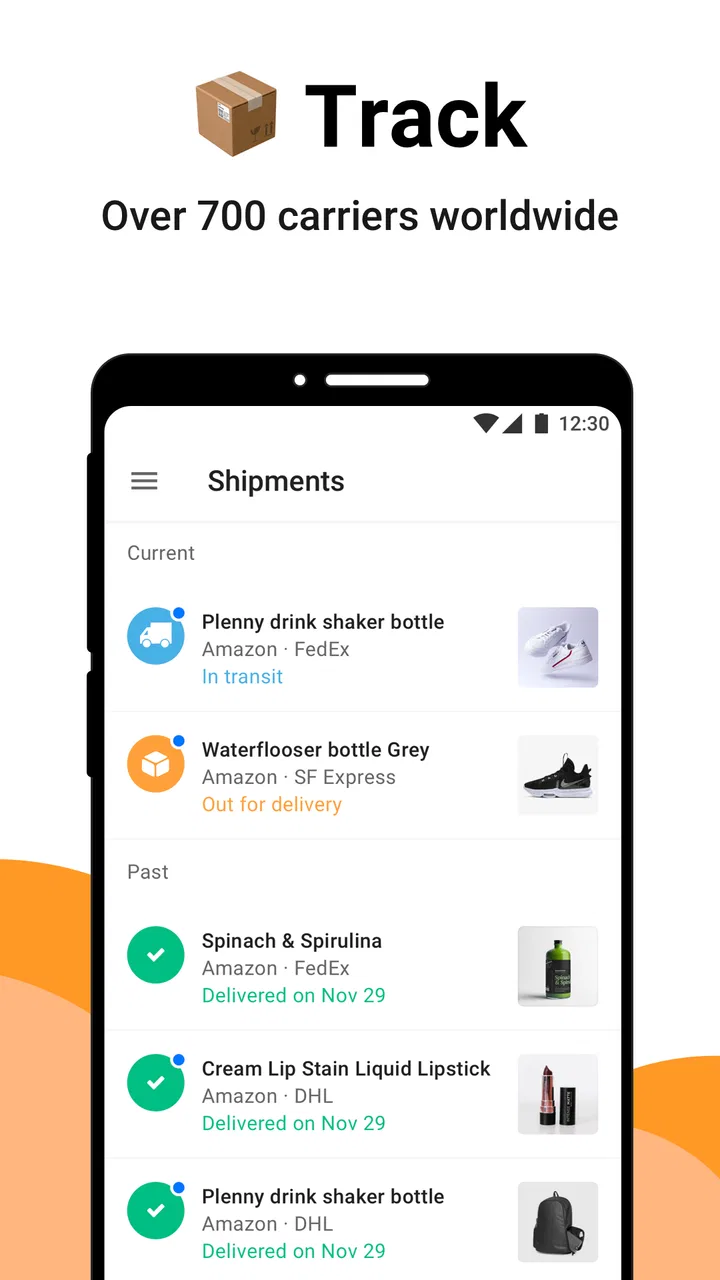
The broad carrier coverage is one of its biggest practical strengths. The app supports tracking across more than 700 carriers, including familiar names such as UPS, DHL, FedEx, USPS, DPD, and Amazon. That matters in a shared home because different people rarely buy from sellers that use the same delivery company. I do not have to build a household routine around one carrier’s application.
I also like the distinction between tracking a package and managing an order. The app helps me follow delivery progress, but it does not replace the retailer when I need to change an item, request a refund, or resolve a missing product. That boundary is important. If a parcel is delayed, I can use the tracking information to understand what is happening, but I still need to contact the seller or carrier when the problem requires action.
For a household, the best workflow is to agree on who adds each shipment and who is responsible for checking it. If everyone enters the same parcel independently, the shared routine becomes messy rather than simpler. I would use one person as the organizer for common deliveries, while letting each person keep their own shopping information separate when privacy matters.
Useful organization without turning the app into a family dashboard
One of the less obvious advantages is that a unified tracker can reduce interruptions. Instead of asking, “Has my package moved?” several times a day, a household member can check the shipment directly. That is especially helpful when one person works from home, has limited availability, or is responsible for receiving deliveries during a busy afternoon.
There is a trade-off, though. A package tracker is not automatically a shared household calendar. I would not assume that adding a shipment tells everyone else who should collect it, where it should be placed, or whether a delivery is safe to leave unattended. Those decisions still need a message or a simple household agreement. The app can support coordination, but it does not remove the human part of coordination.
My practical tip is to use recognizable names for shipments rather than relying only on tracking codes. A label such as “kitchen replacement part” is easier to understand than a long sequence of letters and numbers when several parcels are moving at once. I would also avoid adding a package to a shared view if the item itself is private or if another person should not see the order information.
Setting it up while keeping account boundaries clear
The initial setup is straightforward in concept: I add a shipment, identify the relevant carrier, and use the tracking reference so the app can display progress. The important part is not technical complexity but deciding what information belongs in the app and who should have access to it. In a shared-device situation, that decision matters more than the number of taps required to begin.
I would start by tracking one active delivery rather than importing every old order at once. That makes it easier to see whether the status information is useful for my particular carriers and shopping habits. Once the workflow feels comfortable, I could add other shipments gradually. This approach also prevents a cluttered first screen full of parcels that have already arrived.
Households should be careful about confusing a shared phone with a shared account. If several people use the same device, one person may see shipment details left open by another. I would lock the device and close the app when necessary, especially if deliveries contain gifts, personal items, or information that should remain private. The app is convenient, but convenience should not become an excuse to ignore ordinary account boundaries.
I would also keep retailer accounts and tracking access conceptually separate. A tracking number can show delivery progress, but it is not the same as permission to manage the purchase. If someone in the household needs to return an item or ask about a payment, they should use the original shopping account or contact the merchant. This separation helps prevent a common mistake: assuming that a delivery tracker is also an order-management system.
What to do when tracking information looks incomplete
Tracking events are only useful when the carrier has scanned or reported the parcel. If the status appears unchanged, I would first check whether the shipment was recently created, whether the carrier selected is correct, and whether the retailer has actually handed the parcel over. A quiet tracking screen does not necessarily mean the package is lost.
This is where the app is less powerful than a direct carrier account. The carrier may provide specialized instructions, delivery preferences, or local support that a multi-carrier tracker cannot replace. I prefer AfterShip Package Tracker for a consolidated overview, then move to the carrier or retailer when I need detailed intervention.
Another sensible habit is to compare the displayed status with the delivery estimate from the seller. If the two disagree, I would treat the tracker as a helpful indication rather than an absolute promise. Delivery networks change, and an update can lag behind the physical movement of a parcel. The app helps me notice progress; it cannot control the shipment.
Coordinating deliveries without creating confusion
For shared use, the strongest benefit is visibility. If I know that a parcel is approaching, I can tell the right person to watch for it or arrange a handoff. This is more useful than repeatedly opening separate carrier pages, particularly when a household receives deliveries from several stores in the same week.
I would create a simple rule: the person who places the order records the tracking information, and the person expecting the item communicates any special timing needs. That avoids a situation where everyone assumes someone else is monitoring the parcel. The tracker provides the information, while the household rule assigns responsibility.
There is also a useful distinction between urgent and ordinary shipments. A replacement needed for work equipment deserves more attention than a nonessential purchase. I would avoid treating every status change as an emergency, because constant checking can make the app feel noisy. Instead, I would use it as a reference point and only escalate when the delivery affects a real plan.
When a parcel is shared between people, clear naming becomes especially valuable. “Birthday gift,” “school supplies,” or “medicine organizer” communicates more than a tracking code, but labels should still respect privacy. On a device used by children or guests, neutral wording may be the better choice. This is a small workflow detail, yet it makes a noticeable difference when several shipments appear together.
Where it compares well with separate carrier apps
Using individual carrier apps can be better when I rely heavily on one delivery company and want that company’s most detailed tools. A dedicated carrier app may be the natural choice for delivery preferences, local support, or account-specific services. It can also make sense for someone who rarely receives packages from anywhere else.
AfterShip Package Tracker is more convenient when my orders are spread across different carriers. I do not need to remember which application matches each parcel, and a household member can learn one tracking workflow instead of several. That simplicity is the reason I would recommend it to a frequent online shopper who wants an overview rather than a deep relationship with one courier.
Compared with checking retailer order pages, the app is useful when I buy from multiple stores and want delivery information in one place. Retailer pages remain better for invoices, cancellations, returns, and product-specific support. I see the tracker as the layer between “the order has shipped” and “I need to contact someone about the order.”
Compared with a basic notes app, it has a more meaningful purpose because shipment statuses can be followed rather than merely recorded. A note can store a tracking number, but it cannot provide the same focused view of delivery progress. On the other hand, a notes app may be better for recording who should receive a parcel, where it belongs, or what action to take after arrival. I would use both only if that extra coordination is genuinely needed.
Age, trust, and responsible shared-device use
The Everyone age rating makes sense for the app’s basic purpose: checking deliveries is an ordinary household activity. Still, an age rating is not the same as a recommendation to share every order detail with every person using the device. Children may be able to understand a delivery status, while adults should decide which purchases, addresses, and account details remain private.
I would be comfortable letting a young person check whether a family parcel is moving, provided the device and account are already set up appropriately. I would not hand over a logged-in shopping environment without supervision, because the important issue is not the tracking screen alone. It is the surrounding information that may be visible through notifications, order references, or retailer messages.
Trust also matters between adults. A shared tracker can make deliveries easier to coordinate, but it can feel intrusive if one person expects to see every purchase made by another. Before using it as a household tool, I would agree on whether it is for common packages only or for everyone’s individual orders. That conversation prevents the app from becoming a source of unnecessary tension.
For privacy-conscious users, the safest approach is selective tracking. Add only the shipments that need coordination, keep personal purchases in the appropriate individual space, and avoid leaving the app open on an unlocked device. These are not special features; they are sensible habits that make a general-purpose tracker work better in a shared environment.
Who will appreciate it and who should choose something else
I think the app suits people who order from many retailers, receive parcels through different carriers, or want a single place to check delivery progress. It is also a good fit for households where one person regularly receives packages for others and needs a quick overview without opening several services.
I would be less enthusiastic about recommending it to someone who receives very few deliveries and already has a reliable carrier app. In that situation, adding another tracking tool may create more maintenance than value. It is also not the right solution for someone looking for full purchase management, returns, payment history, or a household task system. Those needs belong to retailer accounts, carrier services, or separate organization tools.
Frequent international shoppers may also want to test how well their usual carriers report updates before making the app their only source of information. Multi-carrier convenience is appealing, but unusual routing or delayed scans can make a direct carrier page more informative. My advice is to treat the app as the first place to look, not the only place to look when a delivery becomes complicated.
My household verdict after using it
AfterShip Package Tracker succeeds because it addresses a familiar irritation: delivery information is scattered across stores and couriers. Its free price makes it easy to try, and its broad carrier coverage gives it a clear advantage over relying on one carrier’s application. The current version is 5.25.6, and the app supports Android devices running version 6.0 or later, which makes it accessible to people using older compatible phones as well as newer ones.
The service has also reached over 10 million installs, so it is not an obscure experiment that depends on a very narrow shopping routine. I would still judge it by my own carriers and household habits rather than by popularity alone. A large user base does not change the basic limitation: tracking visibility is different from delivery control or customer support.
My favorite use is simple: I add the shipments that matter, give them clear names, and use the resulting overview to decide who needs to be ready. I do not expect the app to coordinate the entire home, protect every private purchase automatically, or solve a carrier dispute. Keeping those expectations realistic makes the experience much smoother.
My recommendation is straightforward: choose it if you want one practical place to follow parcels from multiple carriers and you are willing to keep account boundaries clear. Skip it if one carrier already handles all your deliveries or if you need order management rather than tracking. For a shared household, it works best as a lightweight information hub—useful for knowing what is coming, but still dependent on clear communication and sensible privacy habits.
FAQs for AfterShip Package Tracker
01What is AfterShip Package Tracker and how does it work?
AfterShip Package Tracker is a delivery-tracking app that brings shipment updates from different couriers into one place. After adding a tracking number, the app identifies the carrier when possible and displays events such as confirmation, dispatch, transit, customs processing, out-for-delivery status, and delivery. It is useful for monitoring purchases from multiple stores without checking every courier website separately.
02Which carriers and shipments can I track with AfterShip Package Tracker?
The app supports tracking for a broad range of postal services, express couriers, and international carriers, although availability can vary by country and shipment type. Most standard tracking numbers work once the carrier has received and scanned the parcel. Some economy, marketplace, freight, or unregistered shipments may provide limited information, delayed updates, or no online tracking at all.
03Is AfterShip Package Tracker free to download and use?
AfterShip Package Tracker can generally be downloaded at no cost, but the exact features, advertising, and subscription options may depend on the current Android or iOS version and the user’s region. Basic shipment tracking is typically the main purpose of the free experience. Before subscribing, review the in-app pricing, renewal terms, and included benefits carefully, since plans may change.
04Can the app send notifications about delivery progress?
Yes, AfterShip Package Tracker is designed to provide status notifications for tracked shipments, helping you notice important changes without repeatedly opening the app. Alerts may cover events such as a parcel entering transit, reaching a local facility, being held in customs, going out for delivery, or arriving. Notifications depend on carrier data, device permissions, internet access, and the accuracy of the tracking number.
05Does AfterShip Package Tracker guarantee accurate delivery dates?
No tracking application can guarantee a delivery date because it depends on the courier, seller, customs authorities, weather, transportation conditions, and the quality of available scans. AfterShip presents the latest information supplied by the carrier and may show an estimated arrival date, but that estimate can change. For urgent or valuable packages, use the courier’s official support channel when a shipment appears delayed or incorrectly updated.
Pros
- Tracks packages from many carriers in one app.
- Automatic shipment updates reduce the need to check carrier websites.
- Supports delivery notifications and status alerts.
- Clean interface makes shipment details easy to find.
- Useful for monitoring several online orders at once.
Cons
- Carrier support and tracking accuracy can vary by country.
- Some advanced features may require a paid plan.
- Updates may arrive late when carriers delay data sharing.
- The app can feel unnecessary for users with few shipments.
- Notifications may become excessive when tracking many packages.

AfterShip Package Tracker
Gallery